How to Cite Sources in MLA: A Clear, Quick Guide
Learn how to cite sources in mla with clear examples for books, websites, and more. Write your paper confidently with MLA guidance.
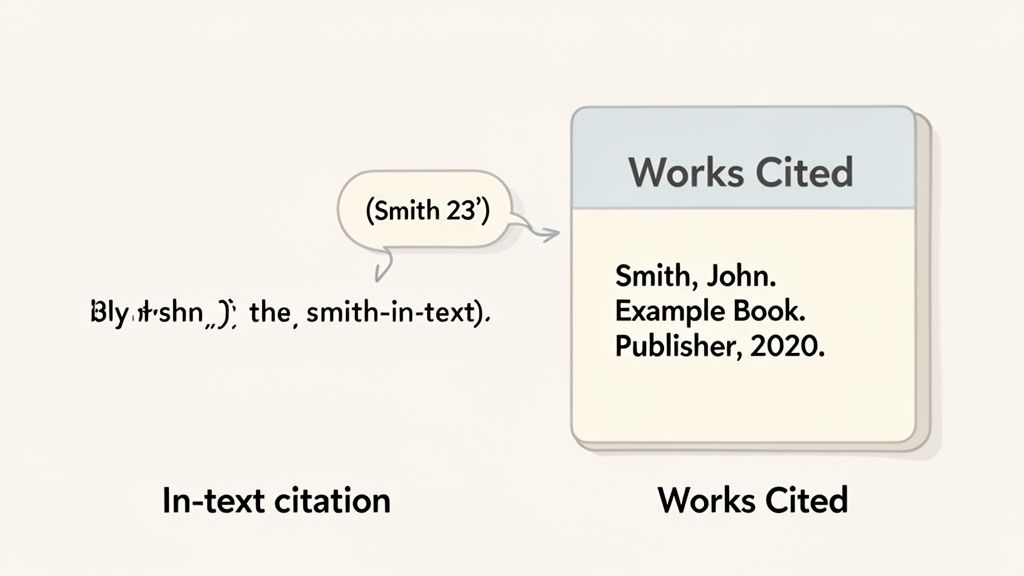
When you cite sources in MLA, you’re using a simple, two-part system: a quick in-text citation right in your paragraph and a full entry on your Works Cited page. Think of the in-text citation as a signpost pointing your reader to the complete source details at the end of your paper.
Understanding MLA Citation: The Core Principles
Learning MLA can feel like memorizing a bunch of arbitrary rules, but it’s much easier once you understand its main purpose: give credit where it's due and help your reader find your sources.
Imagine you're having a conversation. When you bring up an idea from your research, the in-text citation is a quick nod to where you got it, like saying, "This came from Smith."
If your reader gets curious and wants to know more—who Smith is, what they wrote, or where to find it—they just flip to your Works Cited page for all the details. This system keeps your writing smooth and easy to read while upholding academic integrity.
The Two Pillars of MLA Citation
The entire MLA framework is built on the connection between these two parts. Every single in-text citation must have a corresponding entry on the Works Cited page. It's a closed loop.
The MLA format has changed a lot over the years. The 9th edition, introduced in 2021, really shook things up for the estimated 85% of high schools and over 70% of colleges in the U.S. that rely on it. The new guidelines moved toward a more flexible, container-based system.
The core idea is simple: provide just enough information in the text to identify the source, then provide the rest on the Works Cited page. This keeps your paragraphs from getting cluttered with publication details.
To help you see how this all connects, here’s a quick breakdown of the two citation types. The first word in your Works Cited entry—almost always the author's last name—is what links everything together.
MLA In-Text vs Works Cited At a Glance
This table sums up the relationship between the two key components of MLA citation.
| Citation Type | Purpose | Example Format |
|---|---|---|
| In-Text Citation | Briefly identifies the source within your paper at the point of use. | (Smith 42) |
| Works Cited Entry | Provides complete publication details for readers to locate the source. | Smith, John. *The Art of Writing*. Publisher, 2020. |
Getting this fundamental connection down is the first real step to mastering MLA. Before you even start writing, having a solid plan can save you a ton of headaches. To learn more about structuring your paper, check out this guide on how to write a research paper outline.
Crafting Perfect MLA In-Text Citations
Think of your in-text citations as little signposts for your reader. They're meant to be quick, subtle references that point back to your Works Cited page without interrupting the flow of your writing. Getting this right is all about creating a seamless link between the ideas in your paper and the sources you used to support them.
The standard format couldn't be simpler: the author's last name and the page number, tucked neatly inside parentheses. You'll almost always place this at the end of the sentence, just before the period.
For instance, if you're pulling a concept from Jane Austen's work, your sentence might look like this:
Elizabeth Bennet’s realization that she was mistaken about Mr. Darcy is a pivotal moment in the novel, highlighting the dangers of prejudice (Austen 279).
In a flash, your reader knows the idea is from Austen and can find the exact spot on page 279. It's clean and efficient.
Handling Different Author Scenarios
Of course, real-world research isn't always so tidy. You’ll be dealing with sources that have multiple authors, and MLA has a clear-cut rule for just about every situation you'll run into.
Two Authors: When a source has two authors, just list both of their last names, connected by "and." It’s that easy.
- Example: Research indicates that collaborative learning improves retention (Smith and Jones 45).
Three or More Authors: To keep things from getting cluttered, MLA simplifies citations for sources with three or more authors. You only need the first author's last name, followed by "et al.," which is Latin for "and others."
- Example: Recent studies on climate change present alarming data (Davis et al. 112).
Mastering these details is more than just busywork. Believe it or not, some studies show that citation errors can account for up to 15-20% of grade deductions on college research papers. This makes knowing when to use "et al." or where to place a comma incredibly important. For a deeper dive, the MLA in-text citation guidelines from Purdue OWL are an excellent resource.
Citing Sources Without Page Numbers
In today's world, you're just as likely to cite a website, video, or podcast as you are a book. Since these sources don't have page numbers, your in-text citation only needs the first piece of information from its Works Cited entry—usually the author's last name or the title.
Let's say you're citing an online article from journalist David Brooks. With no page numbers to worry about, the citation is simply his last name.
- Example: Brooks argues that social trust is essential for a functioning democracy (Brooks).
What if the source has no author? You just use a shortened version of the title in quotation marks. If the article was called "The Future of Renewable Energy," your citation would look like this:
- Example: The push for solar power is expected to triple over the next decade ("The Future").
This same logic works for any other media. Citing a YouTube video from a creator named Sethi is just (Sethi). A podcast episode from hosts Orton and Blennerhassett would be (Orton and Blennerhassett).
Navigating Special Citation Cases
Every now and then, you'll hit a citation snag that feels a bit tricky. These situations are actually pretty common, but they require a slightly different approach.
Same Author, Multiple Works: If you’re referencing two different books by Margaret Atwood in your paper, you need to tell your reader which one you’re talking about. Just add a shortened version of the title to the citation:
(Atwood, *The Handmaid's Tale* 96)for one and(Atwood, *Oryx and Crake* 45)for the other.Indirect Sources: What happens when you're reading a book by Smith, and Smith quotes another researcher named Jones? To cite the words from Jones that you found in Smith's book, you use the abbreviation "qtd. in" (which stands for "quoted in"):
(qtd. in Smith 102).
Following these specific rules ensures your citations are always crystal clear, which in turn strengthens your own credibility. And just as a solid citation supports your evidence, a powerful thesis statement anchors your entire argument. If you're still polishing yours, our guide on how to write a thesis statement can give you the direction you need.
Crafting Your MLA Works Cited Page
Your Works Cited page isn't just a list you slap at the end of your paper—it's the backbone of your research, giving credit where it's due and showing your reader exactly where you found your information. Building one might feel like a chore, but MLA actually makes it pretty straightforward with a flexible, template-based system.
The secret is what MLA calls the nine core elements. Think of them as a universal checklist for any source you encounter. You won't use all nine for every source, but running through the list ensures you don’t miss any crucial details, whether you're citing a book, a scholarly article, or a YouTube video.
The 9 Core Elements of an MLA Citation
At its core, every citation aims to answer a few simple questions: Who made this? What is it called? And where can I find it? MLA organizes these details into a predictable order.
Here are the building blocks you'll work with:
- Author.
- Title of Source.
- Title of Container,
- Other Contributors,
- Version,
- Number,
- Publisher,
- Publication Date,
- Location.
The elements in bold are your most common players. The "container" is simply the larger work that holds your source. For an article, the journal is the container. For a webpage, the website is the container. Simple as that.
This flowchart shows how your quick in-text citation points the reader directly to the full entry on your Works Cited page.
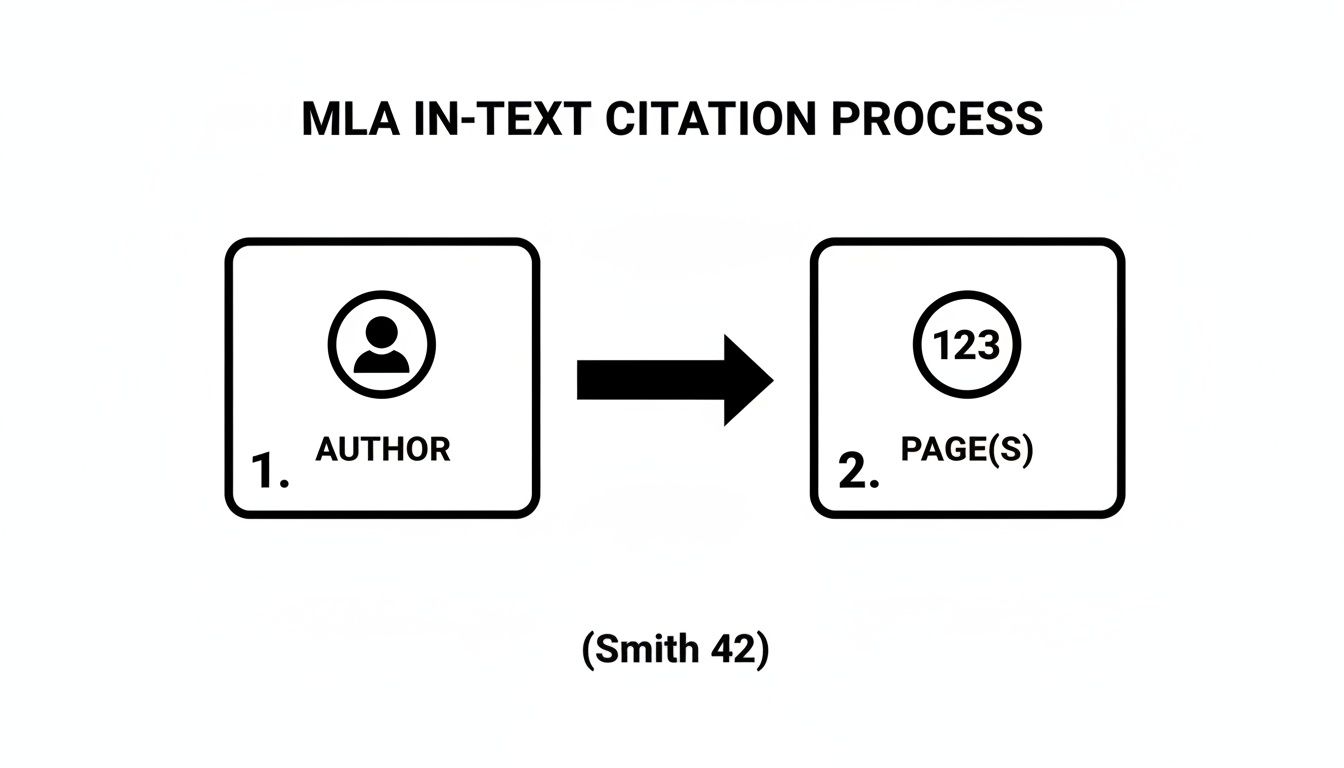
It’s a clean system. The author's name and page number in your essay create an unbroken trail to the full source details, proving your work is built on credible evidence.
Works Cited Templates for Your Go-To Sources
Seeing is believing, so let's put these elements into action. The easiest way to master MLA is by seeing the patterns for the sources you'll use most. I've broken down the templates and examples for the heavy hitters below.
This table provides the essential structure for the most common source types you'll encounter in your academic work.
| MLA Works Cited Entry Templates for Common Sources |
|---|
| Source Type |
| Book |
| Journal Article |
| Web Page |
| YouTube Video |
Using these templates as a guide, you can confidently build accurate citations for nearly any source you find.
Examples in Action
Citing a Book
Books are typically the most straightforward. You just need the author, title, publisher, and year.
- Example: Gladwell, Malcolm. Outliers: The Story of Success. Little, Brown and Company, 2008.
Citing a Journal Article from a Database
When you find an article in a database like JSTOR or Academic Search Premier, you're dealing with two "containers." The journal is the first, and the database is the second. Getting this right is a key skill when you learn how to read research papers.
- Example: Williams, David. "Kinship and Cant." American Quarterly, vol. 65, no. 2, June 2013, pp. 293-316. JSTOR, www.jstor.org/stable/43823441.
A Quick Tip on URLs: While MLA 9 recommends including the URL, some professors prefer you leave it out, especially for databases. Why? Because many database URLs are temporary and won't work for anyone else. In fact, around 60% of academic libraries suggest omitting these "session-specific" links. When in doubt, always ask your instructor what they prefer.
Citing a Website or Web Page
Citing a web page means you sometimes have to do a little detective work to find the author or publication date. If there's no author, don't sweat it—just start the citation with the page's title.
- Example: Ouellette, Jennifer. "Physicists Uncover New Quirks of the Proton's Inner Life." Quanta Magazine, 24 May 2021, www.quantamagazine.org/physicists-uncover-new-quirks-of-the-protons-inner-life-20210524/.
Citing a YouTube Video
Online videos follow the same logic. The channel name or uploader acts as the "author," and YouTube is the "container."
- Example: Kurzgesagt – In a Nutshell. "What If the World Went Vegetarian?" YouTube, 15 Oct. 2023, www.youtube.com/watch?v=R46-2g_p8c.
Formatting Your Works Cited Page: The Final Polish
Once you've crafted your individual citations, you need to format the page itself. These small details are what make your paper look polished and professional.
- Page Title: Start a new page and center the title Works Cited at the top. No bolding, no italics, no quotation marks.
- Alphabetical Order: This is non-negotiable. Arrange every entry alphabetically by the author's last name. If a source has no author, alphabetize it by the first main word of the title (ignore "A," "An," or "The").
- Double-Spacing: The entire page should be double-spaced, with no extra line breaks between entries.
- Hanging Indent: This is the signature look of a Works Cited page. The first line of each citation sits flush against the left margin, but every subsequent line for that same entry is indented by 0.5 inches. This format makes it incredibly easy for a reader to scan the list of authors.
How To Format Your Paper In MLA Style
Getting your citations right is a huge part of MLA, but it's only half the story. The other half is presenting your work in a clean, professional format. Think of your paper's visual presentation as the first impression you make—and MLA style gives you a clear blueprint for making it a good one.
These formatting rules aren't just arbitrary, either. The standard 1-inch margins, double-spacing, and readable 12-point font like Times New Roman are all designed to make your paper easier to read and give your instructor room to leave feedback. Nailing these details shows you're serious before they even read your first sentence.
Laying the Groundwork in Your Document
Before you even start writing, do yourself a favor and set up your document correctly in your word processor. This small step up front saves you from a massive headache of reformatting everything later.
Here are the four foundational pieces to get right from the start:
- Margins: Set them to exactly 1 inch on all four sides—top, bottom, left, and right.
- Font: Stick with a legible, standard font. Times New Roman is the classic choice, but other simple fonts like Arial or Calibri are usually fine. Just make sure the size is 12-point.
- Spacing: Double-space the entire paper. That means everything: the heading, the title, the body, and your Works Cited page. Don't add any extra spaces between paragraphs.
- Header: In the upper right-hand corner of every single page, put your last name followed by the page number (for example, Rodriguez 1). Your word processor's header tool can automate this so the page number updates for you.
Nailing the First Page
Your first page has a unique heading format. One of the nice things about MLA is that it doesn't require a separate title page. All your key information goes right in the top-left corner of page one.
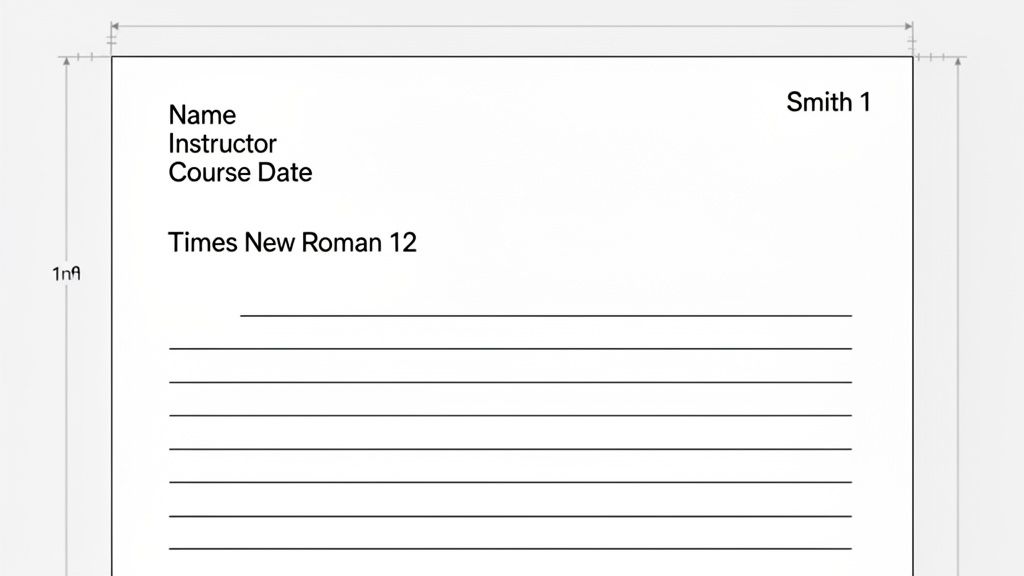
Take a look at how this all comes together. Notice how the header in the top-right corner is a separate element from the heading information on the left.
The heading itself is double-spaced and includes these four lines, in this specific order:
- Your Full Name
- Your Instructor's Name
- The Course Name and Number
- The Date
After typing the date, just hit Enter once and center the title of your paper. Use standard title case capitalization, but don't bold, underline, or italicize it. From there, hit Enter one more time, align left, and you’re ready to start your first paragraph.
Key Takeaway: A properly formatted paper communicates professionalism and a respect for academic standards. Spending just a few minutes on your margins, header, and spacing shows a commitment to quality that speaks volumes about your work.
Of course, formatting is just one piece of the puzzle. To really elevate your work, it helps to understand the broader context of academic writing. For a deeper dive into the mechanics of clear and effective prose, check out this comprehensive guide to English writing.
Solving Tricky MLA Citation Problems
Real-world research is messy. Sources rarely fit into perfect, predictable boxes, and this is where a lot of students get tripped up. Learning to handle these tricky situations is a skill that will absolutely set your work apart.
You'll inevitably find a website with no author, an article without a date, or a source quoting another source. Don't panic. MLA has straightforward rules for these common headaches.
Navigating Sources with Missing Information
One of the most frequent challenges is citing a source that's missing a key piece of information, like a webpage without a clear author or a publication date. The MLA Handbook has specific protocols for these exact situations, ensuring your citation stays clear and useful. The MLA Style Center's website is a great resource for the official guidelines.
The rule of thumb is simple: if you can't find a piece of information, you just skip it and move on to the next element in the MLA format.
No Author: When a work has no credited author, you start the Works Cited entry with the title instead. For the in-text citation, use a shortened version of that title in quotation marks.
- Works Cited Example: "The Impact of Deforestation on Amazonian Wildlife." Eco Watch Journal, 15 July 2022, www.ecowatchjournal.org/deforestation-impact.
- In-Text Example: The loss of habitat has endangered over 400 species in the region ("The Impact").
No Publication Date: Can't find a publication date on a website or online article? No problem. Just add an access date at the end of the citation. This simply tells your reader when you found the information.
- Example: Johnson, Chloe. "Digital Minimalism in Practice." The Mindful Tech, www.mindfultech.com/digital-minimalism. Accessed 18 Oct. 2023.
Citing Unconventional and Digital Sources
These days, research goes far beyond books and articles. You might need to cite anything from a personal interview to a social media post. The same core principles apply—find the key elements like author, title, and where you found it.
A personal interview, for example, is a common source in qualitative research. To cite it, you just list the name of the person interviewed, label it as a "Personal interview," and give the date. It's that simple.
Example: Smith, Jane. Personal interview. 10 May 2023.
This same logic applies to other unique formats. Special cases, like knowing how to cite a poem with line numbers, require a slightly different approach. The key is to think about what information your reader needs to find your exact source.
Here are a couple more examples:
- Online Photograph: Adams, Ansel. The Tetons and the Snake River. 1942. The Museum of Modern Art, www.moma.org/collection/works/44136.
- Social Media Post (X/Twitter): @NASA. "Our #Artemis I mission is returning to Earth! The Orion spacecraft is set to splash down in the Pacific Ocean on Dec. 11." X, 5 Dec. 2022, 1:30 p.m., twitter.com/NASA/status/1599837873423761408.
Handling Indirect Sources
Okay, what about this scenario? You're reading an article by one author, and they quote another expert. You want to use that expert's quote, but you found it in the article, not the original source. This is called an indirect source, and it happens all the time.
To cite it correctly, use the abbreviation "qtd. in" (which stands for "quoted in") to show your reader where you actually found the information.
Let's say you're reading a book by historian Sarah Miller, and she quotes a primary source from a general named John Davis. You would write your in-text citation like this:
General Davis declared the strategy "a calculated risk with monumental consequences" (qtd. in Miller 78).
Then, in your Works Cited list, you only create an entry for the source you actually read—in this case, Miller's book. This tells your reader that you found Davis's words within Miller's work on page 78. Using this technique is crucial for demonstrating honest and transparent research practices.
Tackling Tricky MLA Citation Scenarios
Even when you have a good handle on the basics, some MLA formatting questions seem to come up over and over. These are the tricky little details that can trip you up when you're in the middle of writing and just want to get your sources right. Let's clear up some of that confusion.
Here are direct answers to the questions I hear most often from students.
What’s the Real Difference Between MLA 8 and MLA 9?
For students and writers, the good news is that the jump from MLA 8 to MLA 9 wasn't a seismic shift. If you learned MLA 8, you're in great shape. The 9th edition, which came out in 2021, is more of a fine-tuning of the flexible "container" system that the 8th edition introduced.
Think of it as a helpful update, not a total rewrite. The most notable additions were:
- Inclusive Language: MLA 9 now includes dedicated guidance on using inclusive language and being mindful of terms related to gender, race, and disability in your writing.
- Notes: It offers more detailed instructions on formatting endnotes and footnotes, which can be a lifesaver if your professor requires them.
- Writing Mechanics: The handbook beefed up its advice on grammar, punctuation, and other writing conventions.
The Bottom Line: If you know MLA 8, your skills are still 99% on the money. The core principles of citing authors, titles, and containers haven't changed at all.
Do I Have to Put a URL for Every Single Online Source?
This is easily one of the most common points of confusion. The official MLA 9 Style Guide recommends including a full URL or DOI (Digital Object Identifier) for your online sources. The whole point is to make it as easy as possible for your reader to find the exact source you used. Simple enough, right?
But here's the real-world wrinkle. Many instructors will tell you to leave the URL off for articles you found in a library database like JSTOR, ProQuest, or EBSCO. Why? Because those links are often temporary or locked behind a paywall, making them totally useless to anyone without the same subscription.
So, what should you do? Always check your assignment sheet or ask your professor first. Their preference is what matters most. If they don’t say anything, stick with the official MLA rule and include the URL.
What Is a "Container," Really?
Understanding the "container" is probably the single most important concept in modern MLA. It’s the key that unlocks the whole system, allowing you to cite virtually anything you find. A container is simply the larger work that holds the source you’re citing.
Imagine it like a set of nesting dolls.
- A chapter is your source; the book is its container.
- A journal article is your source; the scholarly journal is its container.
- A single webpage is your source; the overall website is its container.
- A song is your source; the album is its container.
Sometimes, a source can even have two containers. For instance, if you find a journal article (source) inside a database (like JSTOR), the journal is the first container, and JSTOR is the second. Once this clicks, you stop memorizing random rules and start seeing citation as a logical process of identifying where your information lives.
Feeling stuck on a tough assignment or need a quick explanation for a complex topic? Feen AI is your on-demand homework helper. Just upload a photo of your problem or type in a question to get clear, step-by-step solutions in subjects from calculus to chemistry. Try Feen AI today and make studying simpler.
Relevant articles
Learn how to write a strong argumentative essay with our guide. We cover building a thesis, using evidence, and structuring your argument for academic success.
Learn how to write a persuasive essay that wins arguments. Our guide covers crafting a strong thesis, finding solid evidence, and structuring your paper.
Learn how to write a lab report conclusion with a clear structure, real examples, and tips to boost your grade.
Learn how to write a conclusion paragraph that leaves a lasting impression. Our guide covers proven structures, real examples, and mistakes to avoid.

Struggling with how to write a thesis statement? This guide breaks down the process with real examples and tips to craft a clear, arguable, and strong thesis.
Learn how to write research paper outline with our guide. Discover formats, structures, and revision tips to build a strong academic blueprint.